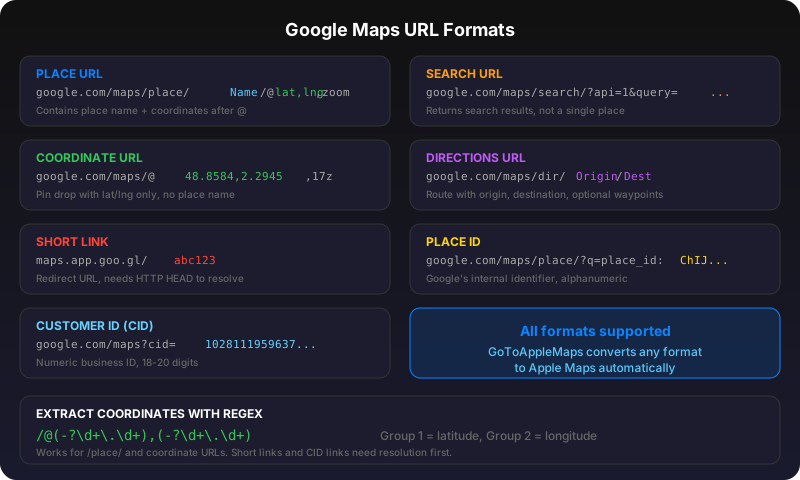
Standard place URL
Format: google.com/maps/place/Place+Name/@lat,lng,zoom. The place name is URL-encoded in the path. Coordinates follow the @ sign. Example: google.com/maps/place/Eiffel+Tower/@48.8584,2.2945,17z.
Search URL
Format: google.com/maps/search/?api=1&query=coffee+shops+near+me. The search URL uses the Maps URLs API with a query parameter instead of a specific place. Unlike /place/ URLs which point to a single business or landmark, /search/ URLs return a list of results for the query. These are common in marketing emails and ads. You can also pass coordinates: google.com/maps/search/?api=1&query=48.8584,2.2945. The key difference from /place/ is that search URLs may not resolve to a single location -- they represent a search intent rather than a specific pin on the map.
Coordinate-only URL
Format: google.com/maps/@lat,lng,zoom. No place name, just a pin on the map. Example: google.com/maps/@52.520008,13.404954,15z. These are common when someone drops a pin manually.
Directions URL
Format: google.com/maps/dir/Origin/Destination. Can include waypoints: google.com/maps/dir/A/B/C. The origin and destination can be place names, coordinates, or place IDs.
Short links
goo.gl/maps/abc123 and maps.app.goo.gl/xyz are redirect URLs that expand to full Google Maps URLs. They hide the actual location data. To extract the location, you need to follow the redirect (HTTP HEAD request) and parse the expanded URL.
Place ID links
Format: google.com/maps/place/?q=place_id:ChIJN1t_tDeuEmsRUsoyG83frY4. These use Google's internal place identifier. They're stable but proprietary -- you can't convert a Google place ID to Apple Maps without looking up the place first.
Customer ID (cid) links
Format: google.com/maps?cid=1234567890. The cid (Customer ID) parameter is a stable numeric identifier for a business listing on Google Maps. Unlike alphanumeric place IDs (ChIJ...), cid values are purely numeric -- typically 18-20 digits. They're often found in Google Business Profile URLs and local search results. Example: google.com/maps?cid=10281119596374313554. Because cid links point to a specific business, they're reliable for conversion -- the tool resolves them to a place name and coordinates, then matches in Apple Maps.
Extracting coordinates with regex
Many Google Maps URLs embed latitude and longitude after the @ symbol. You can extract them programmatically with this regex pattern: /@(-?\d+\.\d+),(-?\d+\.\d+). For example, from google.com/maps/place/Eiffel+Tower/@48.8584,2.2945,17z the regex captures group 1 = 48.8584 (latitude) and group 2 = 2.2945 (longitude). This works for /place/ and coordinate-only URLs. It won't work for short links (no coordinates in the URL) or place ID / cid links (coordinates aren't in the URL path). For those, you need to resolve the URL first, then apply the regex to the expanded URL.
How to convert Google Maps URLs to Apple Maps
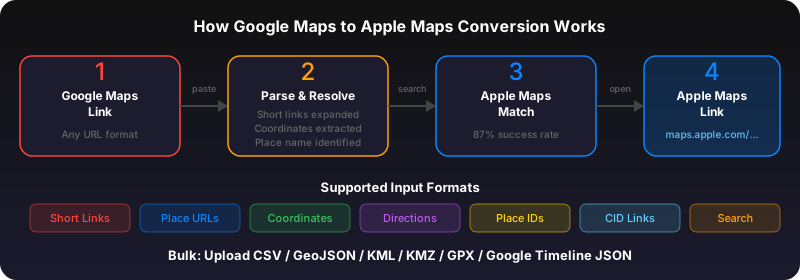
The Quick Convert tool recognizes and processes all these formats automatically. It resolves short links, extracts coordinates or place names from any URL format, and searches Apple Maps for the best match. For the Apple Maps URL format, see our Apple Maps URL scheme reference.
Use Quick Convert on the web, or get the iOS app to convert links directly from Safari, Messages, and any app on your iPhone.
Frequently asked questions
Coordinate URLs (@lat,lng) are most reliable because the location is explicit. Place name URLs work well too. Short links and place ID links require an extra resolution step but still work.
The cid (Customer ID) is a stable numeric identifier for a business listing on Google Maps. Unlike place IDs which are alphanumeric, cid values are purely numeric. You can find them in URLs like google.com/maps?cid=1234567890.
Look for the @ symbol followed by two numbers separated by a comma -- that's latitude,longitude. For example, in google.com/maps/@48.8584,2.2945,17z the coordinates are 48.8584, 2.2945. You can use the regex pattern /@(-?[\d.]+),(-?[\d.]+) to extract them programmatically.