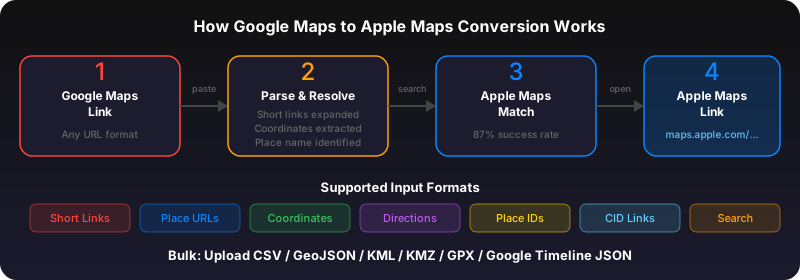
Apple Maps URL format
Apple Maps URLs follow the pattern maps.apple.com/?parameters. Key parameters: q (search query), ll (latitude,longitude), z (zoom level), t (map type: m=standard, k=satellite, h=hybrid), dirflg (directions mode: d=driving, w=walking, r=transit).
Open a specific location
To link to a specific place: maps.apple.com/?q=Eiffel+Tower or maps.apple.com/?ll=48.8584,2.2945. The q parameter searches Apple Maps; ll pins exact coordinates. Combine both: maps.apple.com/?ll=48.8584,2.2945&q=Eiffel+Tower.
Deep link to directions
Get directions to a place: maps.apple.com/?daddr=Eiffel+Tower&dirflg=d (driving). Use saddr for the start address. For transit: dirflg=r. For walking: dirflg=w. On iOS, these open the Apple Maps app directly.
Link from your website or app
Use maps.apple.com links on your website. On Apple devices, they open Apple Maps app. On other devices, they open Apple Maps in the browser (maps.apple.com has a web version). For iOS apps, use the MKMapItem API or the maps:// URL scheme.
Google Maps URL vs Apple Maps URL
Google: google.com/maps/?q=48.8584,2.2945. Apple: maps.apple.com/?ll=48.8584,2.2945. Google uses @lat,lng,zoom in the path; Apple uses query parameters. Google has place IDs (ChIJ...); Apple uses map item identifiers. Converting between them requires extracting coordinates or place names. For a complete breakdown of every Google Maps URL format, see our Google Maps URL formats guide.
Parameter reference table
| Parameter | Description | Example |
|---|---|---|
| q | Search query | q=Eiffel+Tower |
| ll | Latitude, longitude | ll=48.8584,2.2945 |
| z | Zoom level (2-21) | z=15 |
| t | Map type: m=standard, k=satellite, h=hybrid | t=k |
| daddr | Destination address for directions | daddr=Eiffel+Tower |
| saddr | Start address for directions | saddr=Louvre+Museum |
| dirflg | Direction mode: d=driving, w=walking, r=transit | dirflg=w |
Open Apple Maps from Swift
In a SwiftUI or UIKit app, open Apple Maps using the URL scheme:// SwiftUI / UIKit
if let url = URL(string: "maps://?q=Eiffel+Tower&ll=48.8584,2.2945") {
UIApplication.shared.open(url)
}
For web-to-native deep linking, use maps.apple.com URLs. They open the Apple Maps app on Apple devices and show a web map on other platforms.
Use GoToAppleMaps to convert your Google Maps links to Apple Maps in seconds — free, private, no signup.
Frequently asked questions
Yes. maps.apple.com opens a web-based map view on Android browsers. It's not as smooth as Google Maps on Android, but the location is shown correctly.
Yes. maps.apple.com links work in any email client. On Apple devices, they open Apple Maps directly.