Why Google Maps links don't open in Apple Maps
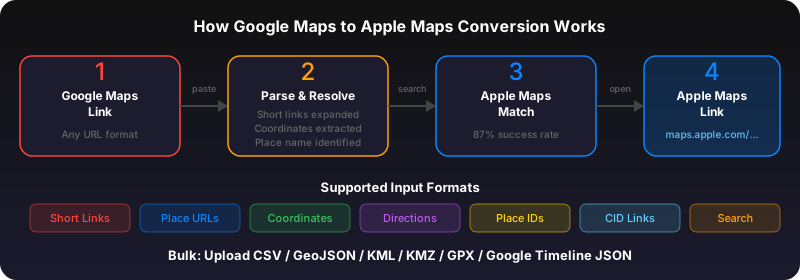
When someone sends you a Google Maps link, tapping it opens Google Maps or a browser -- never Apple Maps. That's because Google Maps URLs use a proprietary format (google.com/maps or goo.gl/maps) that Apple Maps doesn't recognize. You need to extract the coordinates or place name and convert it.
Method 1: Use GoToAppleMaps Quick Convert
The fastest way. Paste any Google Maps link into the Quick Convert tool. It extracts the place, finds it in Apple Maps, and gives you a direct Apple Maps link you can tap to open. Works with regular links, short links (goo.gl/maps), and shared place links.
Method 2: Copy coordinates manually
Open the Google Maps link in a browser. Look for the coordinates in the URL (two numbers separated by a comma, like 52.520008,13.404954). Copy them, open Apple Maps, paste into the search bar, and hit search. This works but is slow and error-prone for place-specific links.
Method 3: iOS Shortcut
You can create an iOS Shortcut that intercepts Google Maps URLs from the share sheet and converts them automatically. However, building and maintaining the Shortcut is complex because Google uses multiple URL formats. The Quick Convert tool handles all formats automatically.
Use GoToAppleMaps to convert your Google Maps links to Apple Maps in seconds — free, private, no signup.
Frequently asked questions
Yes. GoToAppleMaps resolves short links (goo.gl/maps, maps.app.goo.gl) automatically before converting.
Partially. The tool converts the destination. Multi-stop routes need each stop converted individually.
Yes. Conversions happen client-side when possible. No locations are stored or logged.