When you need bulk conversion
Moving your entire Google Maps saved places library. Migrating a business's location database. Converting a travel itinerary with dozens of stops. Transferring a real estate property list. Any time you have more than a handful of Google Maps links, bulk conversion saves hours.
Supported formats
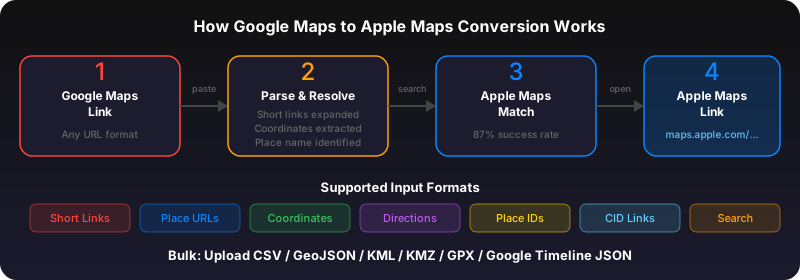
GoToAppleMaps accepts CSV files, plain text files with one URL per line, and Google Takeout exports. The tool automatically detects Google Maps URLs in your data, even if they're mixed with other columns like names and notes.
How bulk conversion works
Upload your file at gotoapplemaps.com. The tool processes each link: resolves short URLs, extracts place names or coordinates, searches Apple Maps, and matches the closest result. You see a live progress bar and can review matches before generating your Guide.
What you get
A single Apple Maps Guide URL containing all your converted places. Open it on iPhone or Mac and every location appears as a pin on your map. Guides sync across all your Apple devices via iCloud.
Match rate and accuracy
Typical match rate is 85-98% depending on location types. Popular restaurants, hotels, and landmarks match nearly 100%. Small businesses, temporary locations, and places in areas with limited Apple Maps coverage may not match.
Use GoToAppleMaps to convert your Google Maps links to Apple Maps in seconds — free, private, no signup.
Frequently asked questions
The free tier supports up to 50 places per upload. For larger lists, split your file into batches.
Yes. Export your saved places from Google Takeout as CSV and upload directly to GoToAppleMaps.
Unmatched places are listed separately so you can search for them manually in Apple Maps. Common reasons: the place was removed, renamed, or isn't in Apple Maps' database yet.