Why this happens
Google Maps links (google.com/maps, goo.gl/maps) are web URLs that point to Google's domain. iOS opens them in Safari or Chrome because they're not Apple Maps URLs. This isn't a bug -- it's how web links work. Apple Maps can only open maps.apple.com URLs directly.
How to force Google Maps links to open in Apple Maps
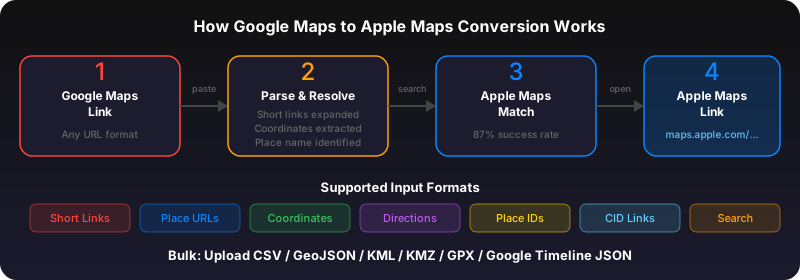
You need to convert the Google Maps URL to an Apple Maps URL. Go to gotoapplemaps.com/quick, paste the Google Maps link, and tap Convert. The result is a maps.apple.com link that opens directly in Apple Maps.
For frequent converters: Install the app
If you regularly receive Google Maps links, install the GoToAppleMaps iOS app. It adds a share sheet extension so you can convert links from any app with two taps -- no copy-paste needed.
Related: Set Apple Maps as your default
While you can't make Google Maps links open in Apple Maps automatically, you can set Apple Maps as your default for directions. On iOS 18+, go to Settings > Apps > Default Apps. This ensures that location requests from Siri, Spotlight, and first-party apps use Apple Maps.
Use GoToAppleMaps to convert your Google Maps links to Apple Maps in seconds — free, private, no signup.
Frequently asked questions
For Apple Maps links (maps.apple.com), yes -- they open in Apple Maps automatically. For Google Maps links (google.com/maps), no -- iOS can't redirect third-party domains. You need to convert the URL.
This isn't something Apple can 'fix.' Google Maps links are web URLs owned by Google. Apple would need Google's cooperation to redirect them, which is unlikely. Conversion tools like GoToAppleMaps are the practical solution.