The problem: Google Maps links on iPhone
When you receive a Google Maps link in iMessage, WhatsApp, or email on your iPhone, tapping it either opens the Google Maps app (if installed) or Safari. Even if Apple Maps is your default, Google Maps links bypass it completely because they point to google.com.
Convert using Safari on iPhone
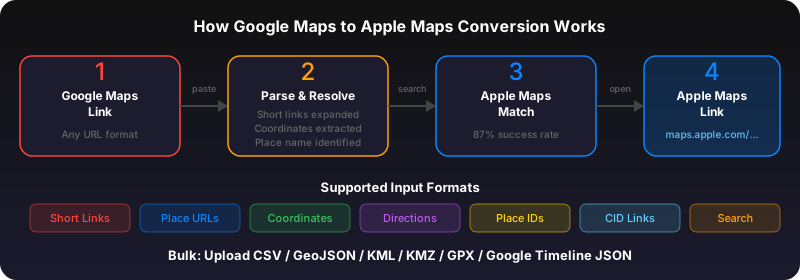
Open the Google Maps link in Safari. Copy the URL from the address bar. Open GoToAppleMaps Quick Convert in Safari, paste the URL, and tap Convert. You'll get an Apple Maps link that opens directly in Apple Maps on your iPhone.
Convert using the GoToAppleMaps iOS app
Install GoToAppleMaps from the App Store. It adds a share sheet extension -- when you long-press a Google Maps link, tap Share, then tap GoToAppleMaps. The place opens in Apple Maps instantly.
Set Apple Maps as your default on iPhone
On iOS 18+, go to Settings > Apps > Default Apps and set Apple Maps for navigation. This makes links from Messages and Mail prefer Apple Maps, though Google Maps links still need conversion since they're web URLs to google.com.
Use GoToAppleMaps to convert your Google Maps links to Apple Maps in seconds — free, private, no signup.
Frequently asked questions
No. The web tool at gotoapplemaps.com works in Safari without any install. The app adds share sheet convenience.
Yes. The web converter works on any iPhone with Safari. The iOS app requires iOS 17 or later.