Why people are switching from Google Maps to Apple Maps
Millions of iPhone and Mac users are making the switch from Google Maps to Apple Maps -- and the reasons go far beyond brand loyalty. Apple Maps in 2026 is a fundamentally different product than the one that launched with iOS 6 in 2012. Apple has spent over a decade rebuilding its mapping platform from the ground up, and the result is a maps app that rivals or surpasses Google Maps in several important areas.
Here are the most common reasons people are replacing Google Maps with Apple Maps:
- Privacy. Apple Maps does not track your location history, does not build an advertising profile from your searches, and does not sell your data to third parties. Google Maps, by contrast, logs your location history by default and uses it for ad targeting. If you care about digital privacy, Apple Maps is the clear choice.
- Battery life. Because Apple Maps is a first-party app built directly into iOS, it is optimized at the system level. Users consistently report better battery performance during long navigation sessions compared to Google Maps, which runs as a third-party app and competes for system resources.
- CarPlay and Siri integration. Apple Maps is the default mapping app in CarPlay and the only maps app that Siri can fully control. You can say "Hey Siri, navigate to the nearest coffee shop" and get turn-by-turn directions without ever touching your phone. Google Maps works in CarPlay but cannot be triggered by Siri voice commands from the lock screen.
- Seamless Apple ecosystem. Addresses you tap in Messages, Mail, Safari, Contacts, Calendar, and other Apple apps open directly in Apple Maps. Saved locations sync across iPhone, iPad, Mac, and Apple Watch via iCloud. Apple Maps Guides let you organize places into shareable collections.
- Offline maps. Apple Maps now supports downloading entire regions for offline use, with full search and turn-by-turn navigation. No internet connection required.
- Visual quality. Apple Maps features detailed 3D city models, immersive AR walking directions, and Look Around -- Apple's street-level imagery that many users find smoother and more visually appealing than Google Street View.
The biggest barrier to switching has always been the same: "But all my saved places are in Google Maps." This guide solves that problem. We will walk you through every step of the migration, from exporting your Google data to making Apple Maps your everyday default.
Most people complete the full switch in under 30 minutes. The export and import steps take 5-10 minutes. The rest is changing defaults and preferences, which takes another few minutes.
Export your saved places from Google Maps
Before you can move to Apple Maps, you need a copy of all the places you have saved in Google Maps -- your starred locations, favorites, "Want to go" lists, and custom lists. Google provides this data through its Takeout service.
Using Google Takeout (recommended)
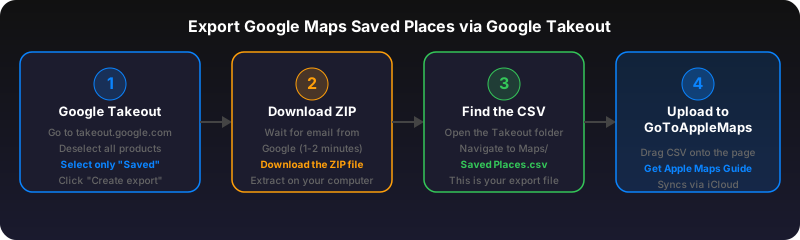
- Go to takeout.google.com and sign in with the Google account linked to your Google Maps data.
- Click "Deselect all" to clear all products, then scroll down and check only Saved (under the Maps section). This includes your starred places, favorites, and custom lists.
- Click "Next step" and choose your export format. Select CSV or GeoJSON -- both work with GoToAppleMaps.
- Click "Create export." Google will prepare your file, which usually takes a few minutes. You will receive an email when it is ready to download.
- Download the ZIP file and extract it. You will find one or more CSV/GeoJSON files containing your saved places.
We have a detailed walkthrough with screenshots in our dedicated Export Google Maps Saved Places guide.
What gets exported
Your Google Takeout export includes place names, addresses, coordinates (latitude and longitude), notes you have added, and the list each place belongs to. It does not include your Google Maps reviews, contributions, or timeline/location history -- those are separate datasets.
Import your saved places into Apple Maps
Once you have your exported file, you need to convert each Google Maps location into an Apple Maps location. This is where GoToAppleMaps comes in -- it is a free tool purpose-built for exactly this task.
Option A: Use the GoToAppleMaps web tool (free, no signup)
- Go to gotoapplemaps.com and upload your exported CSV or GeoJSON file.
- GoToAppleMaps will parse each location, search Apple Maps for the best match, and generate Apple Maps links for every place.
- Download the results as an Apple Maps Guide URL, which you can open directly on your iPhone to add all locations to Apple Maps at once.
Option B: Use the GoToAppleMaps iOS app
- Download GoToAppleMaps from the App Store (free).
- Import your CSV or GeoJSON file directly into the app.
- The app converts each location and creates an Apple Maps Guide -- a native collection of places that syncs across all your Apple devices via iCloud.
- Open the Guide in Apple Maps to see all your imported places on the map.
Option C: Convert places one at a time
If you only have a few places to move, use the Quick Convert tool. Paste any Google Maps link and get an Apple Maps link instantly. This works with all Google Maps URL formats including short links, place URLs, coordinate URLs, and place ID links.
For a complete walkthrough of all import methods, see our Convert Google Maps Saved Places to Apple Maps guide.
Apple Maps Guides are the closest equivalent to Google Maps lists. They are shareable collections of places that appear in your Apple Maps Library. GoToAppleMaps creates these Guides automatically during import. Learn more in our complete Apple Maps Guides guide.
Set Apple Maps as your default maps app
After importing your places, you want to make sure Apple Maps opens whenever you tap an address or map link -- instead of Google Maps intercepting those taps.
On iPhone and iPad (iOS 18+)
- Open Settings.
- Tap Apps > Default Apps.
- Under Maps, select Apple Maps.
On older iOS versions, Apple Maps is already the system default. Links tapped in Messages, Mail, and Safari will open in Apple Maps unless you have explicitly changed the default to Google Maps.
On Mac (macOS Ventura and later)
- Open System Settings.
- Click Desktop & Dock (or General > Default Apps on macOS Sonoma+).
- Under the maps section, ensure Apple Maps is selected.
On Mac, addresses you click in Mail, Safari, Contacts, and Calendar will open in Apple Maps by default unless a third-party app has registered as the default maps handler.
Uninstall or move Google Maps
You do not have to delete Google Maps, but removing it from your Home Screen eliminates the temptation to fall back. Long-press the Google Maps icon, tap "Remove App" or move it to the App Library. If you want to keep it as a backup, move it to a folder on your last Home Screen page.
Change default maps in Chrome and other browsers
When you click a Google Maps link on the web, your browser will open google.com/maps by default. Here is how to redirect those links to Apple Maps instead.
Safari (iOS and Mac)
Safari on iOS already opens map links in Apple Maps when you tap addresses. For explicit Google Maps URLs, install the GoToAppleMaps Safari extension. It adds a button to any Google Maps page that opens the same location in Apple Maps with one tap.
Chrome on iOS
Chrome on iOS tends to open map links in Google Maps. To work around this:
- Copy the Google Maps link.
- Open GoToAppleMaps Quick Convert in a new tab.
- Paste the link and tap the Apple Maps button to open it directly.
Chrome on Mac
Install a redirect extension that rewrites google.com/maps URLs to maps.apple.com URLs, or simply bookmark GoToAppleMaps Quick Convert for one-click conversion. The Quick Convert tool accepts any Google Maps URL and generates the equivalent Apple Maps link.
Firefox, Edge, and other browsers
The same approach works in any browser: paste Google Maps links into Quick Convert or use our Safari extension if you switch to Safari for map-related browsing.
What Apple Maps does better than Google Maps
Apple Maps is not just a Google Maps clone -- it has genuine advantages that make it the better choice for many users. Here is what Apple Maps does better:
Privacy & data protection
- No location tracking or ad profiling
- Search data is not tied to your Apple ID
- Randomized identifiers for each session
- On-device processing for personalization
CarPlay & Siri
- Full Siri hands-free control
- Instrument cluster integration
- Faster route loading via system APIs
- "Hey Siri, take me home" just works
AR walking directions
- Immersive augmented reality view
- Point your phone to see overlaid arrows
- Available in major cities worldwide
- Works indoors in select airports and malls
Look Around
- Smoother and higher-res than Street View
- Binoculars icon on the map for quick access
- Fluid 360-degree transitions
- Coverage expanding rapidly since 2019
Flyover & 3D cities
- Photorealistic 3D models of major cities
- Interactive aerial exploration
- Landmarks rendered in detailed 3D
- Useful for previewing destinations
Ecosystem integration
- Apple Watch turn-by-turn with haptics
- Widgets on Home Screen and Lock Screen
- iCloud sync for Guides and favorites
- Deep Calendar and Contacts integration
What Google Maps still does better
Honesty builds trust. Google Maps still has advantages in some areas, and knowing about them upfront helps you decide if the switch works for your specific needs.
- Street View coverage. Google Street View covers more roads and more countries than Apple Look Around. If you need street-level imagery in rural areas or developing countries, Google still leads.
- Transit coverage in some cities. While Apple Maps has significantly improved transit directions, Google Maps still provides more comprehensive real-time transit data in certain cities, particularly outside North America, Europe, and major Asian metros.
- Business reviews and hours. Google has a larger database of user reviews and business operating hours, built over 15+ years of Google Local Guides contributions. Apple Maps pulls business data from Yelp and other partners, but the volume of reviews is lower.
- Cross-platform native apps. Google Maps has native apps for Android, iOS, and the web. Apple Maps is native only on Apple platforms (though maps.apple.com works in any browser). If you use Android devices alongside your iPhone, Google Maps is more portable.
- Explore and discovery features. Google Maps' "Explore" tab shows trending restaurants, events, and deals nearby. Apple Maps' discovery features are more conservative and less algorithm-driven -- which is either a pro or a con depending on how you feel about algorithmic recommendations.
For most iPhone users in North America, Europe, Japan, and Australia, Apple Maps is now fully competitive with Google Maps for everyday navigation. The privacy benefits alone make it worth the switch.
Making the switch stick: tips for your first week
The hardest part of switching maps apps is not the technical migration -- it is breaking the habit of opening Google Maps. Here are practical tips to make Apple Maps your new muscle memory:
- Delete or hide Google Maps for one week. Move it to the App Library or delete it entirely. After seven days without it, most people find they do not miss it. You can always reinstall it later.
- Use Siri for all navigation. "Hey Siri, directions to [place]" always opens Apple Maps. Building this habit replaces the "open Google Maps and type" pattern with something faster and safer while driving.
- Add Apple Maps widgets to your Home Screen. The "Nearby" widget and the "Pinned Guides" widget keep Apple Maps visible and accessible. Widgets reduce the friction of opening the app.
- Download offline maps for your area. Open Apple Maps, tap your profile picture, tap "Offline Maps," and download your home city and any areas you travel to frequently. This eliminates the "What if I lose signal?" concern.
- Report any issues you find. If a business listing is wrong or a road is missing, tap "Report an Issue" in Apple Maps. Apple is responsive to user reports and usually corrects errors within days. Contributing improvements makes the map better for everyone.
- Set up Guides for your regular spots. Create an Apple Maps Guide called "Favorites" and add your most-visited restaurants, shops, and addresses. This replaces your Google Maps starred places with something that integrates natively with iOS.
- Share Apple Maps links. When someone asks "Where is the restaurant?" send them an Apple Maps link instead of a Google Maps link. The link works for everyone -- Apple Maps links open in a browser on non-Apple devices via maps.apple.com.
Whenever someone sends you a Google Maps link, paste it into Quick Convert to open it in Apple Maps. Over time, you will receive fewer Google Maps links as more people in your circle switch to Apple Maps.
Frequently asked questions
Yes. Export your saved places from Google Takeout as a GeoJSON or CSV file, then use GoToAppleMaps to convert each location into an Apple Maps link. You can also use the GoToAppleMaps iOS app to import saved places directly into Apple Maps Guides, which sync across all your Apple devices via iCloud.
On iOS 18 or later, go to Settings > Apps > Default Apps > Maps and select Apple Maps. On earlier iOS versions, Apple Maps is already the system default for all map links opened through Siri, Spotlight, and other system features. To ensure Google Maps links also open in Apple Maps, use the GoToAppleMaps Safari extension or Shortcut.
For navigation and directions, Apple Maps is now comparable to Google Maps in most countries. Apple has invested heavily in ground-truth data collection since 2018 and continuously updates map data. Google Maps still has an edge in business listing completeness and transit coverage in certain developing regions, but the gap has narrowed significantly.
Apple Maps is available on the web at maps.apple.com, which works in any browser on any platform including Android and Windows. However, the native Apple Maps app is only available on iPhone, iPad, Mac, Apple Watch, and Vision Pro. There is no native Android or Windows app.
You may miss a few Google-specific features: Street View has wider global coverage than Apple's Look Around, Google Maps has more detailed transit information in some cities, and Google's business reviews database is larger. However, Apple Maps offers features Google doesn't have, including built-in privacy protection, offline maps with full functionality, immersive AR walking directions, and deep integration with Siri, CarPlay, and the Apple ecosystem.