Why this matters on Mac
Apple Maps on macOS is underrated. It syncs your Guides and favorites with iPhone, integrates with Calendar and Contacts, and uses significantly less battery than Chrome with Google Maps. If you receive Google Maps links in email or Slack, converting them lets you stay in the Apple ecosystem.
Convert in your browser
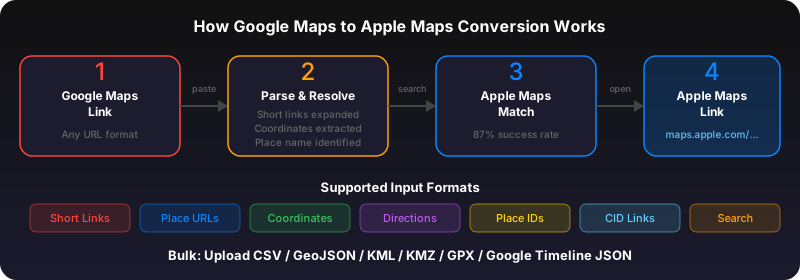
Copy the Google Maps link. Go to GoToAppleMaps Quick Convert, paste the URL, and click Convert. The result is a maps.apple.com link that opens directly in the Apple Maps app on your Mac.
Bulk convert from a spreadsheet
If you have multiple Google Maps links in a spreadsheet (CSV, Excel, Google Sheets), use the bulk converter. Upload your file and get all locations converted to an Apple Maps Guide you can open on Mac or sync to your iPhone.
Use GoToAppleMaps to convert your Google Maps links to Apple Maps in seconds — free, private, no signup.
Frequently asked questions
Most features work: Guides, Look Around, Favorites, and directions. The Mac app doesn't support turn-by-turn navigation (your iPhone handles that).